


Arrow Way: Tap Away Puzzle
4.820.00 Reviews
App Specs
- Version
- 1.4.8
- Updated On
- License
- Free
- Downloads
- 1,000,000+
- Developer
- JoyPop Games
- Categories
- Trivia
- Platform
- Android
Screenshots
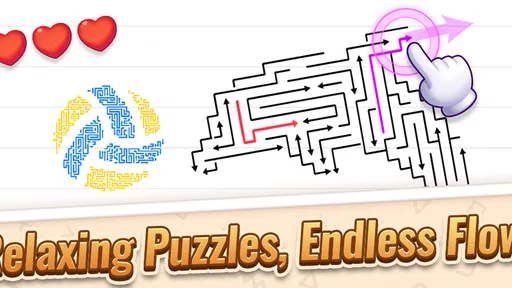
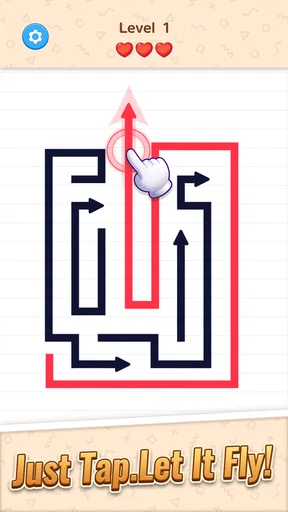
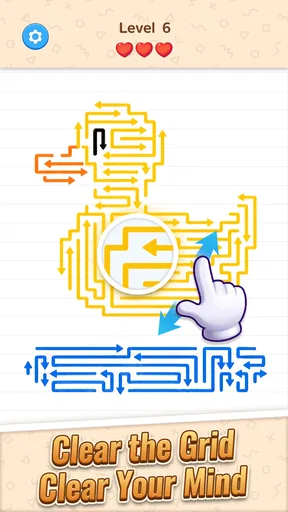
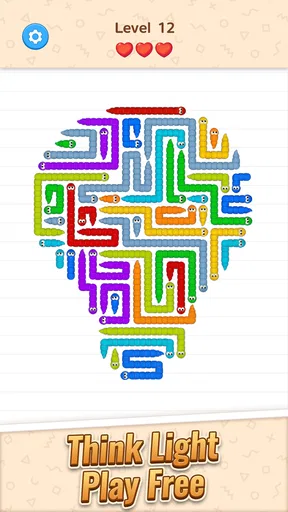
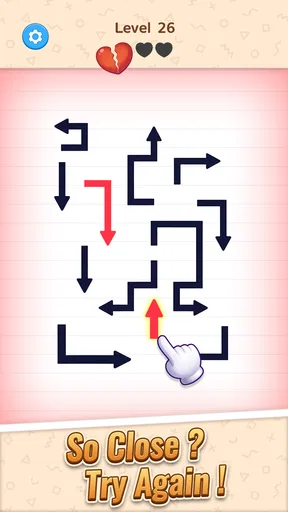
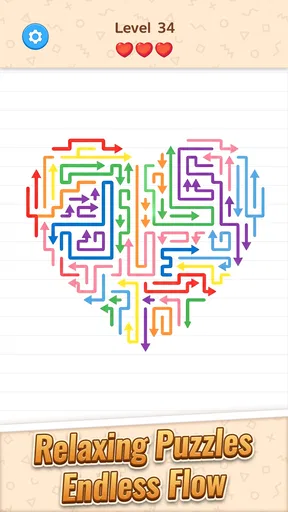
 Analysis by AppCompare
Sharing a phone or tablet can make a small puzzle game part of an ordinary household routine: one person takes a turn while dinner is in the oven, then hands the device to someone else. Arrow Way: Tap Away Puzzle suits that kind of brief, informal play because its central task is easy to explain: work out which arrows can be cleared and tap them in sequence. I’d treat it as a casual game to pass around, though, not as a shared progress system; handing over a device is different from having separate profiles or coordinated turns built into the game.
Passing the device without passing expectations
For a shared-device session, I’d agree on a simple boundary before starting: take a short turn, then give the phone back rather than keeping it for “one more” puzzle. That matters here because a level can feel quick at first, while a tricky arrangement can invite several attempts. If someone else is waiting, it helps to make the handoff point clear instead of assuming the game will naturally stop at a convenient moment.
I would also keep the device owner’s usual settings and account habits in mind. The game is free to download, but it offers in-app purchases priced from $0.99 to $5.99 per item. On a family device, I’d make sure the person who manages purchases knows that before letting a child play, and use the device’s own purchase safeguards where appropriate. That is sensible housekeeping for any free game with optional paid items, rather than a reason to avoid this one outright.
Good for a quiet turn, not every kind of group play
The puzzle’s appeal is individual concentration: you scan the arrangement, decide what can move, then see whether your plan works. That makes it a nice fit for a quiet break or for two people taking turns and comparing their approaches. It is less suited to a lively group that wants everyone to act at once, answer trivia together, or compete through a shared scoreboard. I wouldn’t choose it as a party game; its strongest moments come when the player can focus on the arrows.
There is a useful way to make turns more social without pretending the game has a special multiplayer mode: let one person explain the next move before tapping, then let the other person take the following puzzle. That turns the sequence into a small reasoning conversation. It also shows quickly whether a younger player understands the visual logic or is simply tapping at random, without turning the session into a test.
Age, patience, and trust
It is rated for Everyone, so its stated audience is broad, but I’d still match it to the child’s patience and the household’s screen-time expectations. The basic action is approachable; the challenge comes from figuring out a workable order, and that can frustrate someone who expects every tap to succeed immediately. For a child, I’d present it as a short puzzle to solve together rather than promise that every level will be effortless.
JoyPop Games is the developer, and the game is free with optional purchases. I’d explain that distinction plainly to a child: downloading costs nothing, but some in-game items may cost real money. The game’s age rating is one helpful signal, not a replacement for an adult checking whether its play style and purchase setup suit a particular device and family.
Worth Reading Before You Choose

EA SPORTS FC Mobile 26 Is a Bigger Football Game, but It Takes Time

Flipboard Shows What News Apps Must Do Beyond the Feed

Switching to Android Auto Means Rethinking Your Driving Routine

Google Calendar Makes a Crowded Week Easier to Manage

Ludo King Makes the Most of the Minutes Between Plans

Baby Panda World Brings Quick Play to Modern Phones, but Its Game Library Feels Busy
What kind of puzzle break it offers
Compared with trivia games, which depend on recalling facts, this is a visual-order puzzle: you make progress by reading the board and planning taps. Compared with fast arcade games, it puts more weight on choosing the right move than on sustained speed. If you want a word puzzle, a quiz to play aloud, or a game built around direct competition, I’d pick something else. If you like clearing a visual problem one decision at a time, this is a more fitting choice.
A practical tip is to pause and inspect the whole arrangement before tapping, especially when a move seems obvious. In an order-based puzzle, acting on the first available-looking arrow can narrow your options; a brief scan helps you think about what that move might uncover or block. If a plan fails, I’d change one decision at a time rather than tapping quickly through the same sequence. That makes retries more informative and keeps the game’s puzzle element front and center.
Who will enjoy it—and who may not
I’d recommend it to people who want a compact, visual challenge they can pick up during a break, and to households looking for a low-pressure game that can be handed around. It can also suit someone who finds quizzes tiring but still wants a little mental engagement. The game is free, has an Everyone rating, and has an average rating of 4.8 from around 9,200 ratings, with more than 500,000 installs. Those figures suggest it has found an audience, though they can’t tell you whether its particular puzzle style will click for you.
I’d skip it if you need a game that teaches a subject, gives a deep story, or makes every session meaningfully different through a large social component. I’d also look elsewhere if you dislike repeating a puzzle after a mistaken move, or if you want a game where several people can participate simultaneously. Its challenge is built around looking carefully and choosing a sequence, so patience is part of the appeal and part of the cost.
On a normal afternoon, I can picture opening it while waiting for a meal to finish, solving a puzzle, then letting someone else take the next turn. The best household rhythm is to treat it as a short shared-device activity and check in before continuing, rather than letting an absorbing level stretch into an unexpectedly long session. If the device belongs to a child, I’d keep purchase decisions with the adult and avoid assuming that a broad age rating answers every family’s questions.
Have you ever found yourself stuck in a waiting room or on a long commute, wishing you had a fun and engaging way to pass the time? Well, let me introduce you to Arrow Way: Tap Away Puzzle, a game that’s been my go-to whenever I need to kill some time or just unwind. This game, available on both Android and iOS, is designed to test your strategic thinking and reflexes in a unique and addictive way.
What Makes Arrow Way: Tap Away Puzzle So Captivating?
So, what’s the deal with this game? At its core, Arrow Way: Tap Away Puzzle is a tapping game where the main objective is to clear arrows from the screen by tapping them in the right order. Sounds simple, right? But don’t be fooled by its simplicity; this game is all about strategy and timing. The arrows are initially stacked in a complex grid pattern, and your job is to figure out the sequence to remove them without getting stuck.
The interface is clean and straightforward, making it easy to dive right in without a steep learning curve. I love how the game gradually increases in difficulty, ensuring that you’re constantly challenged and engaged. The devs have nailed the balance between being relaxing yet mentally stimulating.
Visuals and Sound That Complement the Experience
One of the things I always appreciate in a mobile game is solid visuals and sound design, and Arrow Way: Tap Away Puzzle does not disappoint. The graphics are crisp and colorful, making each level visually appealing. The game’s design is minimalist, which helps you focus on the task at hand.
The sound effects add an extra layer of immersion. They’re subtle yet satisfying, especially when you clear a tricky set of arrows. And if you’re someone who prefers a quiet gaming experience, you can easily mute the sounds without missing out on the fun.
Gameplay That Keeps You Hooked
Let’s talk about the gameplay mechanics. The game offers a variety of levels, each with its own unique challenges. As you progress, new elements are introduced, such as arrows that require multiple taps, or obstacles that block your path. This keeps things fresh and ensures that you’re never just mindlessly tapping away.
I found myself getting into a rhythm, trying to beat my previous times and scores. There’s something incredibly satisfying about solving a particularly tough puzzle after a few tries. It’s the kind of game where you tell yourself “just one more level,” and before you know it, you’ve been playing for an hour.
Why You Should Download It
If you’re a fan of puzzle games that require a mix of strategic thinking and quick reflexes, then Arrow Way: Tap Away Puzzle is definitely worth checking out. It’s perfect for those moments when you need a mental break but still want to keep your brain active. Plus, the game is free to download, so there’s really no excuse not to give it a try.
Whether you’re a casual gamer or someone who loves a good challenge, this game has something for everyone. It’s a fantastic way to pass the time, and you might even find yourself getting hooked like I did.
So, what are you waiting for? Head over to your app store, download Arrow Way: Tap Away Puzzle, and start tapping away those arrows! Trust me, you won’t be disappointed.
Checking the practical details before you play
The game is currently at version 1.3.5 and needs Android 7.0 or later on Android devices. It was released on January 8, 2026, and its content rating is Everyone. I’d check the device’s available space and operating-system compatibility before handing it to someone else, especially if the phone or tablet is older. Those small checks prevent a shared play session from turning into a setup chore.
One question people often have about a quick puzzle game is whether it can replace a proper brain-training routine. I wouldn’t treat it as a course or a structured learning tool. Its value is more immediate: it asks you to inspect a visual arrangement, plan a sequence, and adjust after a mistake. That makes it a pleasant mental pause, but not a substitute for lessons, quizzes, or a broader collection of puzzles if variety and progression are your main goals.
Making short sessions work better
Because the game is easy to open and continue playing, I’d decide on a natural stopping point before starting—perhaps one puzzle or a brief turn each. This is especially useful during a commute or while waiting for an appointment, when interruptions are likely. A puzzle that is already underway can be awkward to hand over mid-plan, so finishing a board before switching players makes the experience feel fairer and avoids having the next person inherit a half-solved problem.
For a solo player, I’d use a different approach: slow down on the first move, then speed up only when the layout is clear. That balances the game’s strategic side with the satisfying pace of tapping. It also helps separate a genuine reasoning mistake from a rushed touch. If you find yourself repeating the same failed sequence, take a moment to reconsider the order rather than treating faster tapping as the solution.
A measured household verdict
For households, the strongest case is its low-friction, turn-by-turn nature: one person can solve a board while another watches, offers an idea, or waits for the next turn. Its main trade-off is that it remains a focused puzzle rather than a shared activity with built-in collaboration. I’d be comfortable recommending it as a casual option for a shared phone, provided the device owner handles purchases and everyone agrees on when to pass the device back.
JoyPop Games has made a game that is easy to understand but still asks for attention. I’d choose it for short, quiet breaks and for a child or adult who enjoys visual logic. I wouldn’t choose it for simultaneous group play, educational content, or a session that needs to end automatically after a fixed amount of time. If those limits fit what you want, it’s a straightforward free download to try; if you prefer quizzes, story-driven play, or more social competition, another kind of game will suit you better.
Pros
- Engaging and intuitive gameplay.
- Visually appealing graphics.
- Challenging levels for all ages.
- Smooth performance on most devices.
- No intrusive ads during gameplay.
Cons
- Limited hints can be frustrating.
- Repetitive music might annoy some players.
- Requires internet for leaderboard access.
- Can drain battery quickly on older devices.
- Occasional lag on lower-end phones.
FAQs for Arrow Way: Tap Away Puzzle
What is the main objective of Arrow Way: Tap Away Puzzle?
Arrow Way: Tap Away Puzzle challenges players to clear a board filled with arrows by tapping them in the right sequence. Each tap rotates or removes arrows, and the goal is to clear the board with the fewest moves possible. It’s a test of logic, strategy, and patience, offering a satisfying puzzle experience.
Is Arrow Way: Tap Away Puzzle suitable for all ages?
Yes, Arrow Way: Tap Away Puzzle is designed to be family-friendly and can be enjoyed by players of all ages. The game’s intuitive mechanics and gradually increasing difficulty make it accessible for children, while still offering enough challenge to keep adults engaged and entertained.
Are there in-app purchases in Arrow Way: Tap Away Puzzle?
Arrow Way: Tap Away Puzzle offers in-app purchases that enhance the gaming experience. Players can purchase hints or additional levels. While the core game is free, these optional purchases can help if you’re stuck on a level or wish to access more content quickly.
Does Arrow Way: Tap Away Puzzle require an internet connection to play?
No, Arrow Way: Tap Away Puzzle can be played offline, making it perfect for on-the-go gaming. You can enjoy the puzzles without needing a constant internet connection, though certain features, like updates or in-app purchases, will require online access.
How often are new levels or updates added to Arrow Way: Tap Away Puzzle?
The developers of Arrow Way: Tap Away Puzzle regularly update the game with new levels and features to keep the experience fresh. Updates usually include bug fixes, new puzzles, and sometimes special events. It’s recommended to check for updates frequently to enjoy the latest content.


